
Bug Fixer
Label an issue bug. Get back a cause, a failing test and a fix.
Factorik's Bug Fixer wakes when someone on your team labels a GitHub issue bug. It gathers evidence from your production tools, reproduces the bug with a test that fails for the same reason, fixes the cause and opens a pull request that closes the issue. When the fix is not in the code, it says who needs to act.
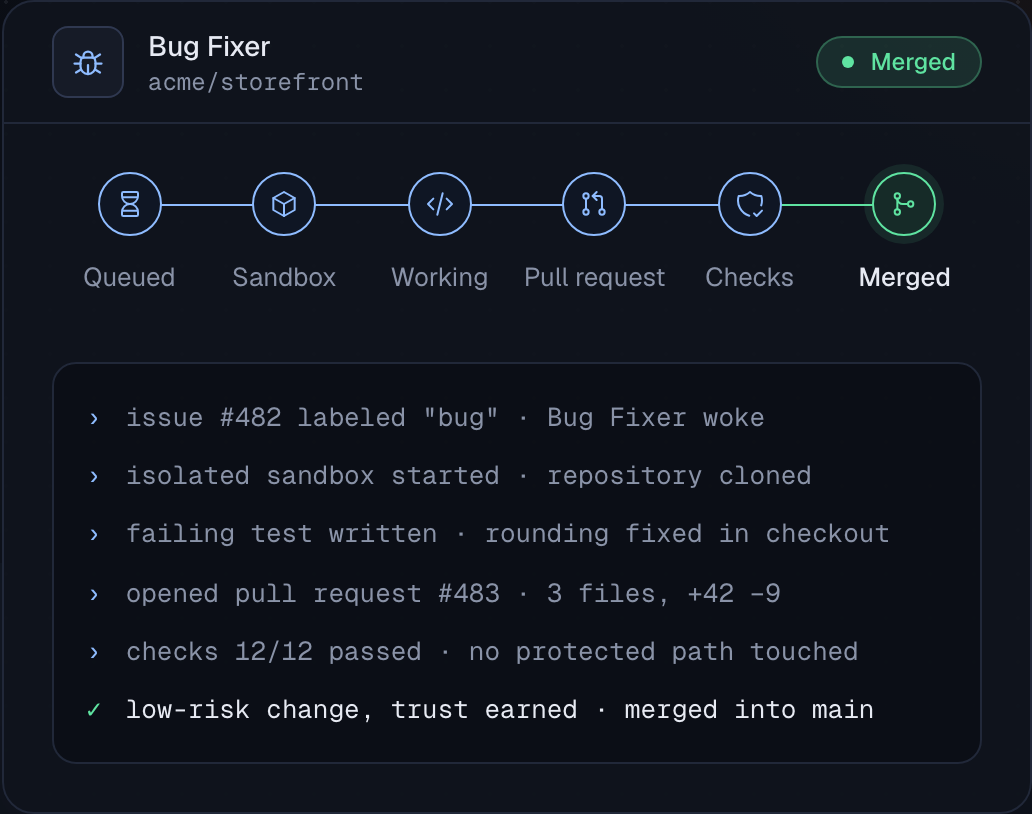
From a bug report to a pull request, step by step
1. Someone labels the issue bug
The label is the hand-off. The Bug Fixer starts on issues labeled bug by default, and you can pick another label. A report nobody on the team has looked at yet starts nothing.
2. It reads the report and builds a timeline
It pins down what was expected, what happened, who is affected and since when. With the tools you granted it (an error tracker, logs, session replay, a read-only database) it finds the matching error, the requests around it and what was deployed just before.
3. It finds the cause and tries to break its own explanation
It follows the evidence into the code and reads every caller of what it suspects. A cause counts only when it explains every symptom: why it started when it did, and why these users and not others.
4. It reproduces the bug with a failing test
In a sandbox of its own, it writes a test that fails for the same reason the bug happens. It does not fix what it could neither reproduce nor explain.
5. It makes the smallest fix that removes the cause
The change goes where every affected path passes through, not a guard in one caller. The new test passes, and so do the project's tests, type checks and linter.
6. Factorik opens the pull request
The pull request closes the issue, and the agent comments on the issue with a link to it. A person merges it, or Factorik does once the agent has earned that level and your merge policy allows it.
A bug report, handled two ways
| Step | By hand | With the Bug Fixer |
|---|---|---|
| Who picks it up | Whoever has time this sprint | The label starts the agent |
| Where the work starts | Asking the reporter for details | The error, logs and deploy history around the report |
| How the cause is shown | A description in the pull request | A test that fails before the fix and passes after it |
| When the fix is not in the code | Often found out late | A write-up of who needs to act, and no code change |
| Who merges | A person | A person, until the agent earns more and your merge policy allows it |
Not every bug ends in a pull request, and that is on purpose
The report is too vague
When the issue and the tools cannot pin the problem down, the run ends blocked and its specific questions are posted on the issue as a reply.
The right fix is large
A migration, a change to a public API or to stored data, or a product decision: the agent does not start it. It leaves a proposal with the cause, the evidence and the reproducing test, and a person decides whether it gets built.
The cause is outside the code
Bad data, configuration, infrastructure, a third party, or a bug already fixed on the current branch: it changes nothing and says who should do what.
The bug left bad data behind
It never repairs production data itself. It says how many records are affected, how to find them and what the repair should be.
Safe by design, not by promise
The sandbox never writes to GitHub. It gets a short-lived token that can only read one repository; what the agent changed is read out of the sandbox and published by Factorik as one commit on a branch Factorik names, never force-pushed and never straight onto the default branch. The text of an issue is treated as data, not instructions.
Every agent starts at the first level: it opens pull requests and a person merges them. It earns the right to merge low-risk changes on its record, and any problem traced to one of its merged changes moves it down a level at once. Auto-merge is off until you turn it on, it requires passing checks, and a change that touches a protected path waits for a person.
Add a Code Reviewer and every fix is reviewed before it merges. When the reviewer asks for changes, the Bug Fixer fixes or argues each point on the same branch.
Questions about the Bug Fixer
What does it need to find real causes?
Read access to the repository, which Factorik gives every run, is enough to start. It works best with the tools that show what production did: an error tracker, server logs, session replay and a read-only database. You grant each tool to the agent in Factorik, and the tool's credentials stay on Factorik's server.
How is it different from the Production Bug Hunter?
The Bug Fixer waits for a person to report a bug and hand it over with a label. The Production Bug Hunter needs no report: on a schedule it looks at production, picks the bug hurting users most and fixes it. Many teams run both.
Can a stranger on a public repository make it run?
Not by opening an issue. The Bug Fixer starts when the label is added, and adding a label is something your team does on GitHub. Text in the issue is read as data, never as instructions.
Can I start it without an issue?
Yes. Press Run now on the agent page and describe the bug in the task. You can also add other triggers, such as a Slack mention or an incoming webhook from your error tracker or issue tracker.
Which git hosts does it work with?
GitHub, which is the only git host Factorik supports today.
Will it merge its own fixes?
Not at first. A person merges its pull requests until its record earns it more, and even then only what your repository's merge policy allows.
Hand over the next bug report
Free for 7 days on the Team plan. No payment details needed.