
A team of agents that builds your product toward your goals
Group your repositories, write the goals, choose how much the team does alone. Agents plan, design, build, review and repair under your merge policy.
The standard team
Five narrow agents, each with one job
Add the standard team to a product and every change passes through the right hands before it lands.
Product Manager plans
Reads the team's goals and how the product is used, then proposes what to build next. A person or the team's mode decides what starts.
Product Designer designs
Proposes design and UX fixes, and approves or questions each change before it can merge.
Software Engineer builds
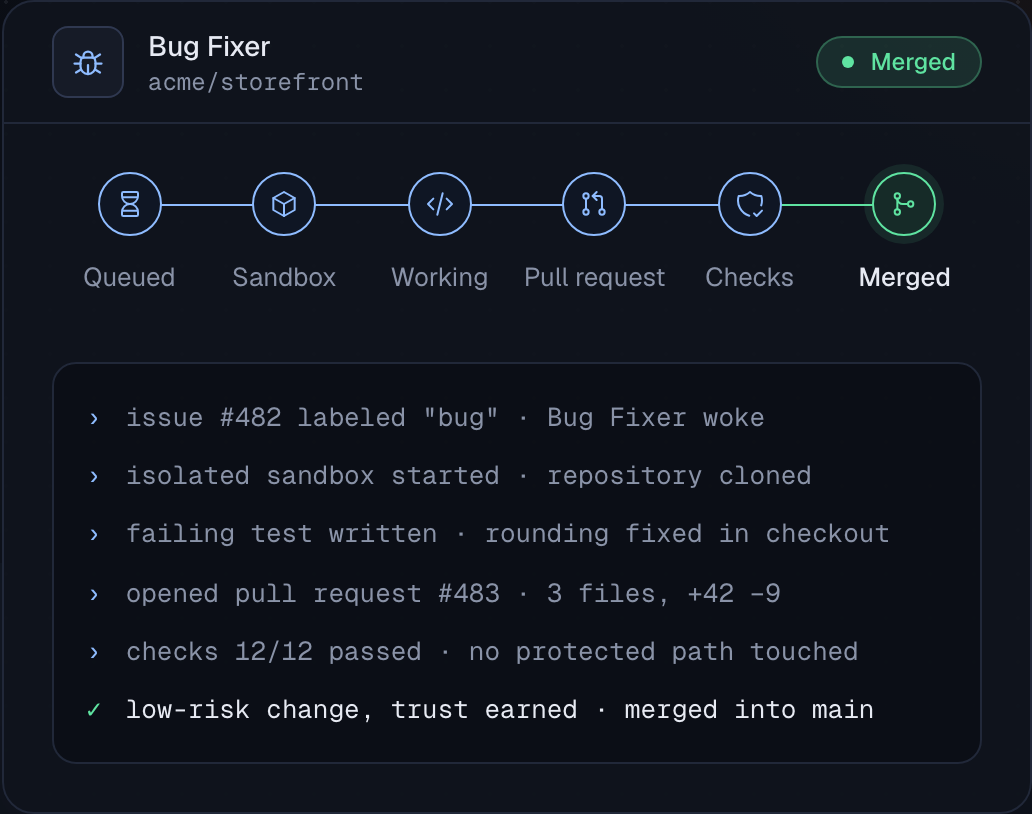
Builds what it is asked in an isolated sandbox, with tests, and opens a pull request on a branch Factorik names.
Code Reviewer reviews
Reads every pull request in context, agents' included, and gives a verdict on the exact commit it read.
CI Fixer repairs
When the default branch breaks, it reads the end of the failed job's log and opens a fix.
One AI engineer, a team of narrow agents, or doing it by hand
Three ways to get routine product work done. Each has a place; here is where they differ.
| One AI engineer | A team of narrow agents | By hand | |
|---|---|---|---|
| Who decides what to build | You, task by task | A Product Manager proposes toward written goals; you or the mode decide | You, in planning |
| Who reviews the change | You | A Code Reviewer and a Product Designer, then you when the policy asks | A teammate, when they have time |
| When CI breaks | You notice and ask for a fix | The author agent fixes its own branch; the CI Fixer repairs the default branch | Whoever is on call |
| How much runs alone | Depends on the prompt and your setup | Supervised, Low-risk alone or Autonomous, set per team | Nothing runs alone |
| How trust grows | Case by case | Each agent earns levels on its record and drops one after a problem | Through experience over time |
| Where you follow it | Scattered sessions | One board with a card per change, one inbox for what needs you | Issues, threads and stand-ups |
You choose how much the team does alone
One setting per team sets every agent and each repository's merge policy at once. Protected paths never change.
Supervised
A person merges every change and chooses every proposal. A good place to start while the team builds a record.
Low-risk alone
Factorik merges small changes that touch nothing sensitive. Everything else, and every proposal, waits for a person.
Autonomous
Proposals start by themselves and Factorik merges what the merge policy allows. Reviews, CI and protected paths still apply.
A chat with every agent
"Ask" gets a reply and changes no code. "Start a run" makes your message real work, merged by the usual rules.
One board, one inbox
Every change is a card from Up next to Watched, listing each agent that touched it. The Inbox holds what needs a person.
What always waits for you
Granting a tool and putting an app online wait for a person in every mode, Autonomous included.
What one change looks like, from goal to merge
Say the team's goal is a faster checkout. The Product Manager reads the goals, the team's standing rules and how the product is used, then leaves a proposal. In Supervised or Low-risk alone, it waits in the Inbox until a person presses "Build it". In Autonomous, it starts by itself. Either way, the Software Engineer works in an isolated sandbox, writes the code with tests and opens a pull request.
The Code Reviewer reads the pull request in context and gives a verdict on the exact commit it read. The Product Designer looks at what users will see. If either requests changes, the engineer fixes or argues each point on the same branch, for a limited number of rounds. If CI fails there, the engineer repairs it. Nothing merges until both approve the current commit, and a person's approval can override.
Merged is not the end. A deploy failing at the merged commit, a revert or a person reporting a problem records a finding, tells the team and moves the agent that made the change down a level at once. That is the deal behind earned autonomy: an agent gains room on a record of changes that held up, and loses it the moment one does not.
Questions engineering leaders ask first
What is an AI agent team in Factorik?
A team is a named group of your organization's repositories with goals of its own. An owner creates it, writes what it is working toward and what it is not, and picks how much it does alone. Every agent on the team reads those goals on every run, so planning, building and reviewing all pull in the same direction.
Can the agents merge changes without a person?
Only when you allow it. Auto-merge is off by default. In Low-risk alone, Factorik merges small changes that touch nothing sensitive. In Autonomous, it merges what the merge policy allows. In every mode, passing checks, reviewer approval of the current commit and protected paths still apply, and each agent's own level limits what it may merge.
What happens when a merged change causes a problem?
Factorik keeps watching after merge. If CI or a deploy fails at the merged commit, the change is reverted, or a person reports a problem, Factorik records a finding, tells the team and moves the responsible agent down a level at once. Every level change is recorded with who made it and why, so you can audit the history.
How do I talk to an agent without it changing code?
Open the agent's "Chat" page and send with "Ask". The agent reads and replies, changes no code, and any work it suggests is left as proposals that wait for a person. Send with "Start a run" instead and your message becomes an ordinary run, published and merged by the usual rules. "Also keep as a rule" saves it to the agent's rules.
Does the team need my approval for tools and launches?
Yes, in every mode. Granting a tool to an agent waits for a person, and putting an app online starts only when an owner presses "Put it online" on the team's page. Even with "Approve every proposal for me" turned on in Autonomous, a launch or a missing tool still waits in the Inbox.
Which git hosts does Factorik work with?
GitHub, which is the only git host Factorik supports today. You install the Factorik app on your GitHub account or organization and choose which repositories it may see. The sandbox only ever gets a short-lived read-only token for one repository, and Factorik's server publishes each change as one commit on a branch it names, never to the default branch directly.
Write the goals. Let the team earn the rest.
Try the Team plan free for 7 days, no payment details needed. Group a product's repositories, add the standard team and start in Supervised.